

What you'll learn
- How 3 AI tools are transforming adult coloring page creation
- ColorBliss, ColoringBook.ai, Coloring.app: strengths and limitations of each
- Turn any photo into a coloring page with AI: step-by-step guide
- Create a complete coloring book in minutes
- Which tool to choose based on your needs: simplicity, variety, or durability
Contents
11- Why Create Your Own Coloring Pages with AI?
- ColorBliss — The Simplest Way to Start
- ColoringBook.ai — The Most Complete for Creators
- Coloring.app — The Most Durable Long-Term Option
- Comparison: Which Tool Should You Choose?
- How to Turn a Photo into a Coloring Page with AI
- How to Create a Complete Coloring Book with AI
- AI Outline & Line Art Generators
- Stress Relief & Adult Coloring Pages with AI
- AI Coloring Page Generators for Commercial Use
- Conclusion
An AI coloring page generator lets you generate coloring pages with AI in just a few clicks — instead of coloring the same designs, you create your own.
The problem: there are several tools on the market, and no honest comparison helps you choose. So we tested the 3 main AI coloring page generators — ColorBliss, ColoringBook.ai, and Coloring.app — to show you exactly what they do, who they’re for, and what we like less.
In this guide, you’ll also learn how to turn a photo into a coloring page, create a complete coloring book, and even generate coloring pages for commercial use. Let’s dive in.
Why Create Your Own Coloring Pages with AI?
Custom AI coloring pages: a new form of relaxation
Adult coloring has exploded in recent years. Mandalas, landscapes, zen patterns… the stress-relief benefits are proven by science (our article details the research on coloring and stress reduction).
But there’s a limit: you’re always coloring someone else’s designs. Custom AI coloring pages change the game. Imagine a mandala inspired by your garden, a landscape that looks like your hometown, or a zen pattern created specifically for your mood today. Creating stress relief coloring pages with AI is a whole new dimension of relaxation.
How AI is transforming coloring page creation
Before AI, creating a coloring page required drawing skills or expensive design software. Today, three approaches exist:
- Text → coloring page: describe what you want, AI generates the coloring page
- Photo → coloring page: upload a photo, AI turns it into a coloring page
- Bulk → coloring book: create a complete AI coloring book in one session
Each tool covers several of these approaches, but each excels in a specific area. Let’s see which one matches your needs.
ColorBliss — The Simplest Way to Start
How it works
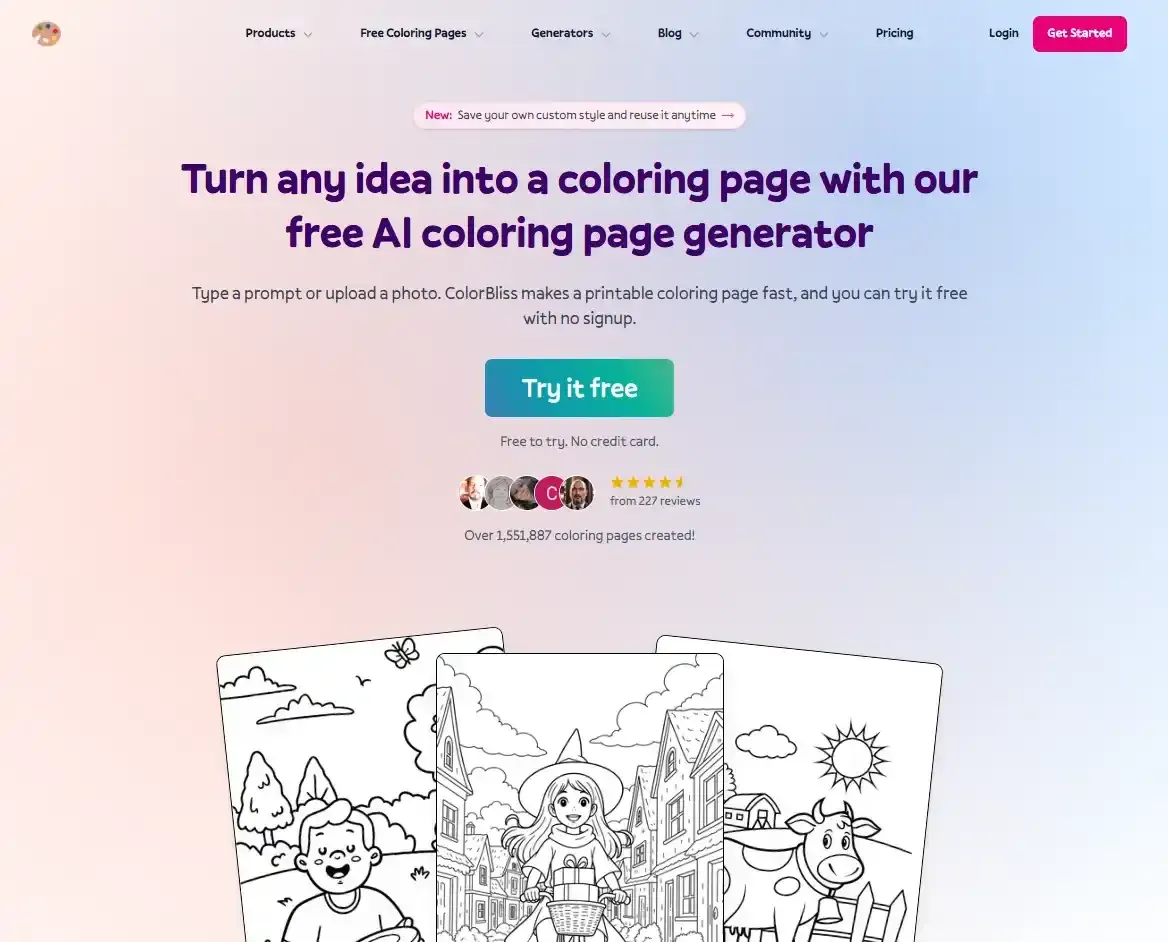
ColorBliss is one of the most accessible AI coloring page generators on the market. Its tagline is clear: “Create any coloring page you can imagine with AI” (per their website). And it delivers on that promise with 5 features — making it a versatile coloring page maker for beginners and casual users:
- Text to Coloring Page — type a description (“floral mandala with roses”), AI generates a coloring page in seconds
- Words, Names & Numbers — create coloring pages with custom words, names, or numbers
- Photo to Coloring Page — turn any photo into a printable coloring page (Hobby+ plan)
- From Drawings — create coloring pages from existing drawings (Hobby+ plan)
- Bulk Generation — create multiple pages at once (Artist+ plan)
The interface is clean, no frills. You pick your feature, enter your idea or upload your photo, click, and get a result. No learning curve, no complex settings to adjust.
The results are clean, with outlines thick enough to be colored with markers or pencils. It’s a good starting point to discover what AI can do for coloring page creation.
Who it’s for
ColorBliss is for anyone who wants an accessible all-in-one tool. With its 5 features, it covers text generation, words/names, photo conversion, drawings, and even bulk creation.
Its affordable price ($7/mo at the time of our test) makes it a solid entry point for those who hesitate to invest in a more complete tool without knowing if AI coloring is right for them. But don’t be fooled: its simplicity doesn’t mean it’s a basic tool.
What we like / What could be better
What we like:
- Extreme simplicity — generate in 3 clicks
- 5 features in 1 single tool (text, words/names, photo, drawings, bulk)
- Affordable starting price ($7/mo at time of test)
- Clean, colorable results
- Words, Names & Numbers on all plans
What could be better:
- Fewer style options than ColoringBook.ai for text generation
- More limited parameter customization
- Book feature is more basic than ColoringBook.ai’s bulk generation
ColoringBook.ai — The Most Complete for Creators
How it works
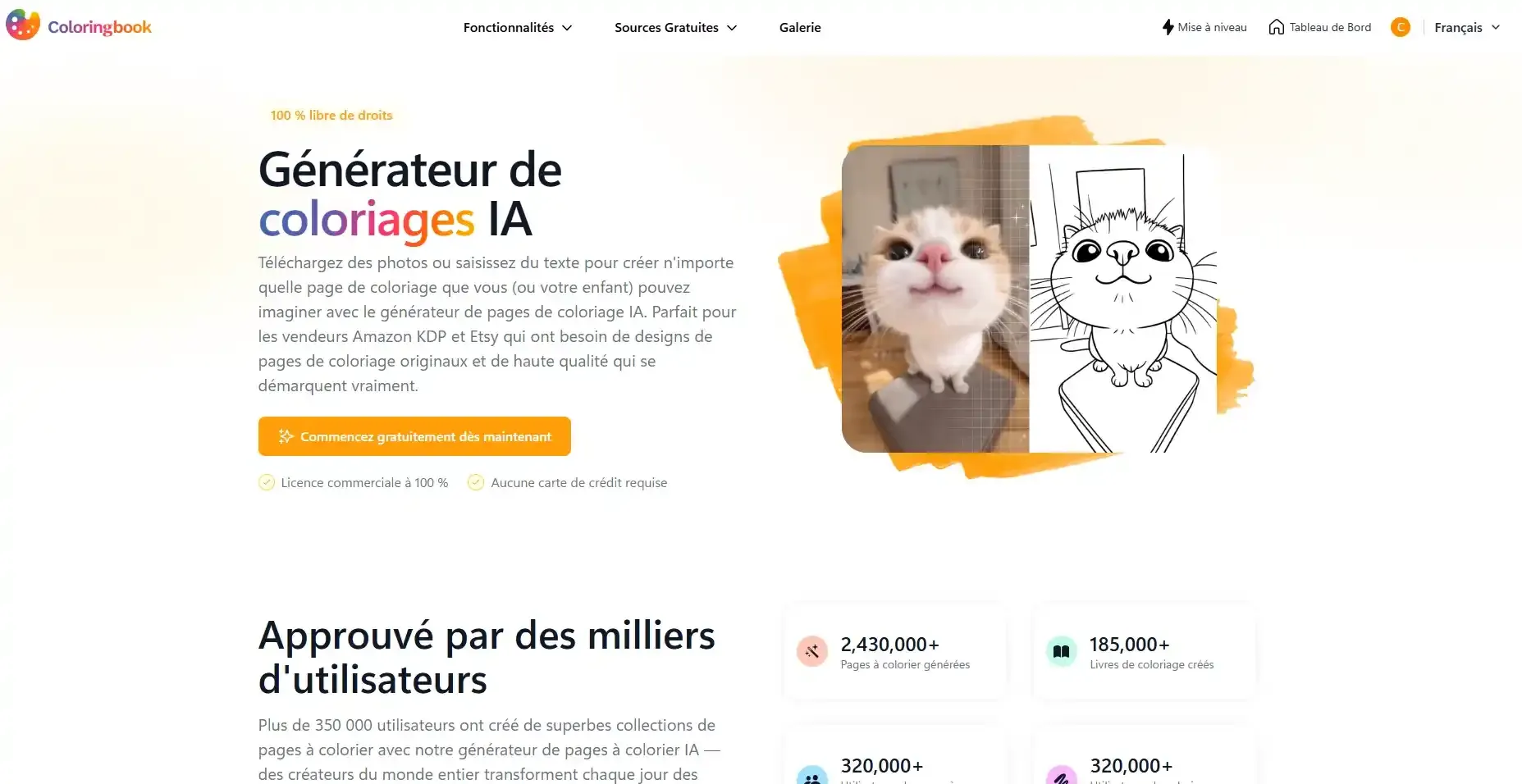
ColoringBook.ai positions itself as one of the most feature-rich tools for creators. Where ColorBliss focuses on simplicity, ColoringBook.ai focuses on variety and specialization with 7 features — functioning as both a coloring page maker and an AI coloring book maker:
- Photo To Coloring Page — turn a photo into a printable coloring page
- Text To Coloring Page — describe what you want, AI generates it
- Coloring Book Generator — create complete coloring books with AI
- Name Coloring Page Generator — generate personalized coloring pages with a name (also works as a word coloring page generator)
- Colorize Drawing — add color to a black-and-white drawing using AI
- Online Coloring — color pages online without printing
- Birthday Coloring Page Generator — create personalized birthday coloring pages (new!)
The standout feature remains the Coloring Book Generator: you define a theme and style, and ColoringBook.ai produces multiple coherent coloring pages in one session. The built-in PDF export lets you assemble a complete coloring book, ready to print.
Unique features like the Name Coloring Page Generator (coloring page with a name integrated into the design) and the Birthday Coloring Page Generator add a personalized coloring pages dimension that few other tools offer — perfect for gifts.
Who it’s for
ColoringBook.ai is for creators who want to go beyond a single coloring page. If you dream of creating your own coloring book — whether for personal use, as a gift, or even to sell — this tool deserves a close look.
It’s also a strong choice for personalized gifts: the Name Coloring Page Generator lets you create a coloring page with the person’s name, and the Birthday Coloring Page Generator is perfect for a unique birthday activity.
The variety of styles is a major advantage: from ultra-detailed mandalas to realistic landscapes, through art deco patterns or botanical illustrations, most adults will find a style that matches their taste.
What we like / What could be better
What we like:
- 7 features — one of the richest on the market
- Bulk generation — create a complete book in one session
- Photo → coloring page built-in
- Name & Birthday Coloring Pages — unique gift ideas
- Online Coloring & Colorize Drawing — no need to print
- Impressive style variety
- PDF export ready to print
What could be better:
- More complex interface than ColorBliss (7 features = more choices to make)
- Higher price, logical given the features
- Bulk generation takes longer
- No dedicated words/names feature like ColorBliss
Coloring.app — The Most Durable Long-Term Option
How it works
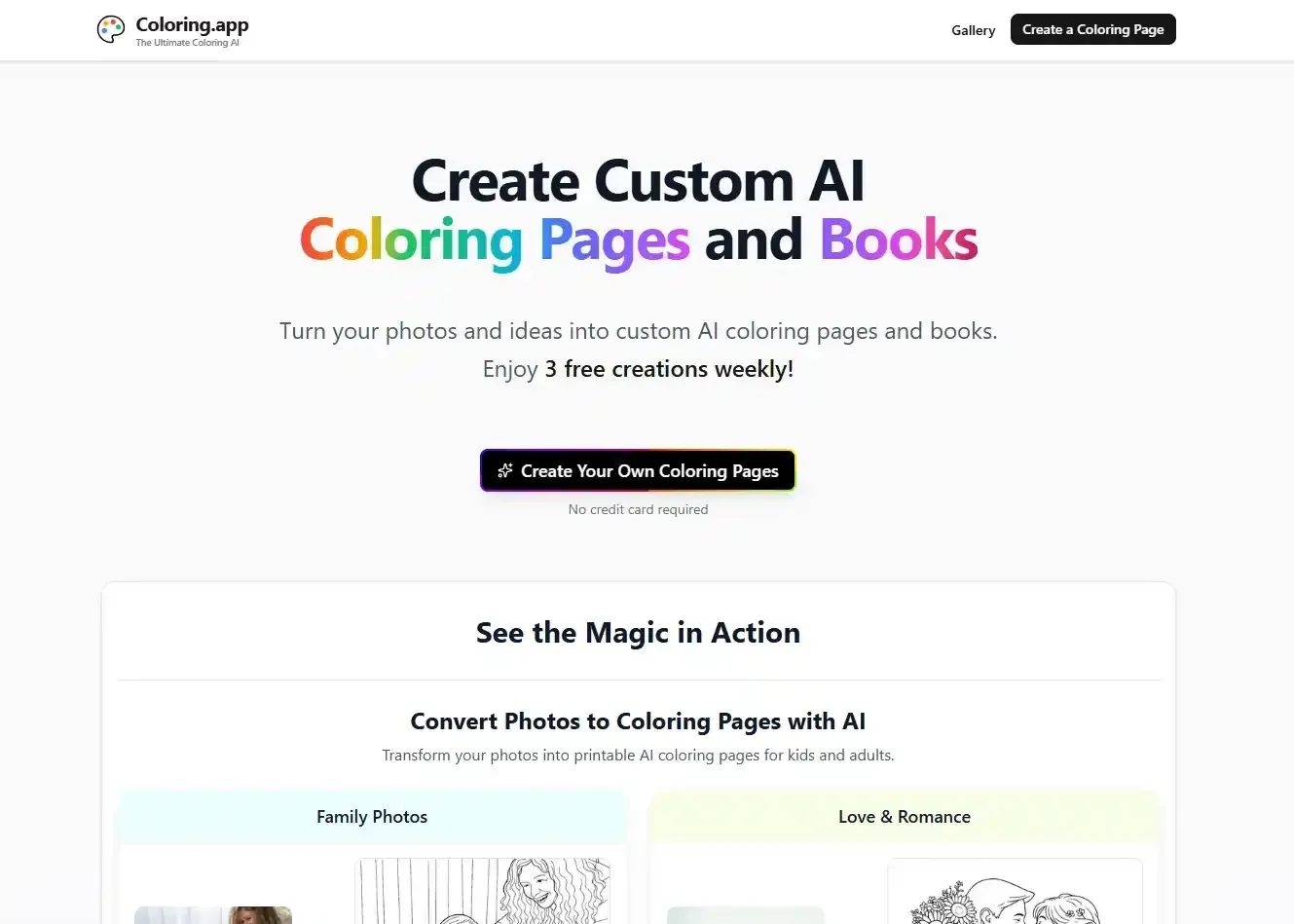
Coloring.app presents itself as “The Ultimate Coloring AI” (per their website) — and for good reason. Founded in January 2025 by Morgan and Mathieu in San Francisco (per their About page), the tool has already attracted 40,000+ users (at the time of our test) and offers an ecosystem far broader than simple coloring page generation. It’s a strong long-term option for anyone serious about coloring.
Here are the main features:
- Photo to Coloring Page — turn a photo into a coloring page with high fidelity (family memories, pet portraits, landscapes)
- Text to Coloring Page (Open-Form Prompt) — describe your vision freely, AI generates it (works as a coloring page prompt generator too)
- Guided Creation (Wizard) — create easily by choosing a theme (animals, fantasy, nature…) via a guided assistant
- Coloring Book Generator — compile your pages into personalized books, with custom covers
- Online Coloring — color directly online with vibrant digital tools
- Printed Books — receive a professionally printed coloring book delivered to your door
- Remix & Edit — remix gallery pages for endless ideas
- Gift Sending — send books or packages to your loved ones
- Coloring Guides — tips, color recommendations, and instructions per page
But what really sets it apart is the ecosystem around it:
- 71,000+ free pages in the community gallery (at the time of our test, one of the largest collections on the market)
- 3 free creations per week (at the time of our test) — a generous and ongoing free tier
- Privacy Focused — your photos are never stored, private mode available
- Advanced Creation Controls — customize styles, detail levels
- Personal Library — all your creations in one place
- Guided Wizard — perfect for beginners who don’t know where to start
Turn a photo into a coloring page: Coloring.app’s strength
The photo → coloring page conversion is one of Coloring.app’s strengths. The AI produces high-fidelity results — your vacation photo, your cat’s portrait, a family memory: almost anything can become a coloring page.
The process is simple:
- Upload your photo
- AI analyzes the image and detects outlines
- Adjust advanced controls if needed (style, detail level)
- Export the coloring page ready to print
Key points:
- Your photos are never stored on their servers (privacy by design)
- Results are particularly impressive on landscapes, animals, and life scenes
- Each page includes Coloring Guides: color recommendations and instructions
This feature is especially relevant for adult stress-relief coloring: turning a photo of a calming place into a coloring page creates an ultra-personalized relaxation tool.
What we like / What could be better
What we like:
- Complete ecosystem: generation, online coloring, printed books, community gallery
- 71,000+ free pages in the gallery — one of the largest collections on the market
- 3 free creations per week (ongoing free tier)
- Photo → coloring page in high fidelity
- Printed Books: professionally printed and delivered to your door
- Privacy: photos never stored, private mode
- Gift Sending: send books/gifts to loved ones
- Guided Wizard: perfect for beginners
- Coloring Guides: tips per page
What could be better:
- Richer interface = more discovery needed at first
- No Name / Birthday feature like ColoringBook.ai
- No words/names feature like ColorBliss or ColoringBook.ai
- Community gallery includes both adult and kid-oriented content
Comparison: Which Tool Should You Choose?
Comparison table
| ColorBliss | ColoringBook.ai | Coloring.app | |
|---|---|---|---|
| Starting price (as of May 2026) | $7/mo | $6.99/mo | $8/mo |
| Photo → Coloring Page | ✅ (Hobby+ plan) | ✅ | ✅ (high fidelity) |
| From drawings / line art | ✅ (Hobby+ plan) | ✅ | ❌ |
| Bulk (book) | ✅ (Artist+ plan) | ✅✅ (advanced) | ✅✅ (with pro printing) |
| Name / Words / Birthday | ✅ (words & names) | ✅✅ (name & birthday) | ❌ |
| Online Coloring | ❌ | ✅ | ✅ |
| Community Gallery | ❌ | ❌ | ✅✅ (71K+ pages) |
| Guided Wizard | ❌ | ❌ | ✅ |
| Gift Sending | ❌ | ❌ | ✅ |
| Printed Books | ❌ | ❌ | ✅ (delivered to you) |
| Privacy (no storage) | ❓¹ | ❓¹ | ✅ |
| Ongoing Free Tier | ❓¹ | ❓¹ | ✅✅ (3/week) |
| Commercial use | ✅ (Artist+ plan) | ✅ (Pro+ plan) | ✅ (select plans) |
¹ We were unable to verify the privacy policy and ongoing free tier of ColorBliss and ColoringBook.ai at the time of testing. Check their websites for the most current information.
ColorBliss vs ColoringBook.ai vs Coloring.app
No “best” tool — each has a unique strength:
- “I want a simple all-in-one tool” → ColorBliss. 5 features in 1, the most accessible interface, the lowest entry price. Text, words/names, photo, drawings, bulk: it’s all there.
- “I want to create a complete book with variety” → ColoringBook.ai. 7 features, advanced bulk, impressive style variety, pro PDF export — the richest tool. Plus unique gift ideas (Name & Birthday).
- “I want a complete ecosystem with gallery and printing” → Coloring.app. 71K+ free pages, printed books delivered to your door, online coloring, gift sending, guided wizard — the tool that goes the furthest.
How to Turn a Photo into a Coloring Page with AI
Want to turn a photo into a coloring page? It’s one of the most popular searches around AI coloring — and for good reason: converting your own photos into coloring pages creates something truly unique.
Good news: all three tools we tested offer this feature. ColorBliss, ColoringBook.ai, and Coloring.app all handle photo-to-coloring-page conversion. Whether you want to convert a picture to a coloring page or turn a family photo into something colorable, these tools have you covered.
Here’s the complete guide.
Turn a picture into a coloring page for free
Can you turn a picture into a coloring page for free? Yes, at least partially:
- Coloring.app offers 3 free creations per week — one of the most generous free tiers available, including photo conversion
- ColorBliss and ColoringBook.ai offer free trials (at the time of our test) to test photo conversion
For a completely free solution with no sign-up, some online image-to-coloring-page converter tools exist, but the quality is often inferior. Investing in a dedicated tool pays off quickly when you see the difference in results.
Photo to coloring page converter tools
A photo to coloring page converter works through artificial intelligence. The technical process is the same whether you’re creating coloring pages from photos of landscapes, pets, or people:
- Analysis: AI detects contrast areas and outlines in your photo
- Extraction: main lines are isolated from the background
- Simplification: unnecessary details are removed for clean line art
- Optimization: line thickness is adjusted for coloring with pencils or markers
Differences between the 3 tools:
- ColorBliss: quick and simple conversion, clean and efficient results
- ColoringBook.ai: conversion integrated into its creation ecosystem
- Coloring.app: high-fidelity conversion with advanced controls, Coloring Guides included, and privacy guarantee (photos never stored)
Convert a photo to a coloring page step by step
The process is similar across all 3 tools. Here are the universal steps to convert a photo to a coloring page (or convert a picture to a coloring page — the terms are interchangeable):
Step 1 — Choose the right photo Prefer photos with good contrast, clear shapes, and little visual noise. Landscapes, flowers, architecture, and animals work particularly well.
Step 2 — Upload to the tool of your choice Drag-and-drop your photo or use the import button. Check each tool’s help section for supported image formats.
Step 3 — Adjust settings
- ColorBliss: direct conversion, few settings — fast and efficient
- ColoringBook.ai: integrated conversion, results consistent with other features
- Coloring.app: advanced controls (style, detail level) + Coloring Guides with color recommendations
Step 4 — Export and print Once satisfied, export your coloring pages from photos in high resolution. A4/Letter format is ideal for most coloring pages.
You can also convert a photo to a coloring page online without downloading anything: all three tools work directly in your browser.
Free app to turn photo into coloring page
Looking for a free app to turn photo into coloring page? All three tools work directly in your browser — no download needed. Coloring.app’s 3 free creations per week make it the most accessible photo to coloring page app for ongoing free use. ColorBliss and ColoringBook.ai offer trial periods to test the conversion.
How to Create a Complete Coloring Book with AI
All three tools let you create coloring books, but with different approaches.
ColorBliss — Quick and simple book
ColorBliss offers a Bulk Generation feature (Artist+ plan) that lets you create multiple coloring pages at once around a theme. You can then compile them into a book. It’s a straightforward way to create a coloring book with AI without hassle.
ColoringBook.ai — Advanced book with variety
ColoringBook.ai is one of the most powerful tools for bulk book creation. You define a theme (e.g., “botanical gardens”), a style (art nouveau, realistic, geometric), and ColoringBook.ai generates a series of coloring pages following that artistic direction. The PDF export automatically assembles the pages into a book ready to print — perfect for generating printable coloring pages in bulk.
Coloring.app — Printed book delivered to your door
Coloring.app compiles your pages into personalized books with custom covers. The major difference: you can receive a professionally printed coloring book delivered to your door. It’s one of the few options that goes all the way to the physical object. You can also send a gift book directly to a loved one via Gift Sending.
Create your own coloring book free
- ColorBliss: free trial to test bulk generation
- ColoringBook.ai: free trial to test bulk generation
- Coloring.app: 3 free creations per week + 71,000+ pages in the community gallery
From idea to printable coloring book
Here are the steps to create your AI coloring book:
- Choose a coherent theme — zen mandalas, local nature, art deco, botanical flowers…
- Define a visual style — it gives the book a unity that makes all the difference
- Generate the pages — in bulk with ColoringBook.ai or one by one
- Select and order — keep the best results, order by increasing complexity
- Add a title page — title, your name, date
- Export as PDF — A4/Letter format, high resolution
- Print — 160g paper minimum for a pleasant feel with markers
AI Outline & Line Art Generators
AI line art generator tools
Line art (or line drawing) is the foundation of any coloring page. AI line art generators produce drawings in pure outlines, without shading or texture, ready to be colored.
ColorBliss offers a “From Drawings” feature (Hobby+ plan) that lets you create coloring pages from existing drawings or sketches. ColoringBook.ai also offers line art conversion with its dedicated line art and pencil sketch features. Coloring.app generates line art indirectly through its photo → coloring page conversion.
For an ai line art generator, both ColorBliss and ColoringBook.ai offer dedicated options, while Coloring.app handles it through its photo conversion pipeline.
Photo to line art converter
A photo to line art converter transforms any photograph into a pure outline drawing. The result is different from a standard coloring page: it preserves more of the original image’s detail and nuance.
Both ColorBliss (“From Drawings”, Hobby+ plan) and ColoringBook.ai (line art feature) offer direct photo to line art converter functionality. They give you clean line drawings that can be colored as-is or further refined.
AI outline generator for custom designs
AI outline generators extract the main lines from an image to create a colorable drawing. It’s the technology behind photo → coloring page conversion.
For custom designs — a logo turned into a coloring page, a specific pattern, a technical illustration — these tools offer precision that hand drawing can’t match in terms of speed. You can even convert an image to a coloring page from your phone: several of these tools work directly in your mobile browser.
Looking for an AI coloring page generator from photo specifically? All three tools handle this, but Coloring.app’s high-fidelity mode produces the most faithful results, while ColorBliss offers the fastest conversion.
Coloring page prompt generator
A coloring page prompt generator helps you craft the perfect text description to get the best results from an AI coloring page generator. The quality of your prompt directly impacts the output.
Tips for effective prompts:
- Be specific about style: “intricate mandala with floral elements” > “mandala”
- Mention the level of detail: “highly detailed”, “simple outlines”, “bold lines”
- Include the subject: “botanical garden with roses and butterflies”
- Specify the audience: “for adults”, “complex patterns” (avoid mentioning kids)
Coloring.app’s Guided Wizard acts as a built-in prompt generator: it guides you through theme selection so you don’t have to craft prompts from scratch.
Stress Relief & Adult Coloring Pages with AI
Stress relief coloring pages for adults
Adult coloring for stress relief has proven benefits. But what happens when you can create anti-stress coloring pages with AI, tailored precisely to what calms you?
Imagine: you love Japanese gardens? Generate a zen garden coloring page. Mountains calm you? Create an alpine landscape. Floral mandalas are your refuge? Produce an entire collection.
Stress relief coloring pages for adults become even more powerful when personalized: the simple act of choosing what you’ll color — based on your mood, your need in the moment — is already an act of well-being.
An AI coloring page tool for adults offers a new approach: instead of choosing from generic coloring pages, you generate exactly what you need.
AI coloring page generator for adults
All the tools tested in this comparison can serve as an AI coloring page generator for adults. The key is in the prompt and style chosen:
- ColorBliss: perfect for simple mandalas, quick zen patterns, and creating from drawings or photos
- ColoringBook.ai: ideal for creating complex mandalas with AI, bulk anti-stress thematic series, and personalized coloring pages with names (Name Generator)
- Coloring.app: ideal for turning a photo of a calming place into a personalized coloring page, with Coloring Guides and integrated online coloring
Adult coloring book generator
An adult coloring book generator takes things further: instead of individual pages, you create an entire book tailored to adult tastes. ColoringBook.ai is a strong option here with its bulk generation and impressive style variety. Coloring.app adds the option of receiving a professionally printed book at your door.
For an adult seeking relaxation, the choice of tool depends on the type of anti-stress coloring desired: quick and simple (ColorBliss), rich and varied (ColoringBook.ai), or deeply personal with a complete ecosystem (Coloring.app).
AI Coloring Page Generators for Commercial Use
Creating coloring pages for Etsy
If you’re looking for an AI coloring page generator for Etsy, the key question is licensing. Not all tools allow commercial use of generated images.
Important: We have not independently verified the commercial licensing terms of any of these tools. Always check each tool’s official terms of service before selling generated content. Licensing terms can change at any time.
That said, ColoringBook.ai is often mentioned for commercial coloring book creation due to its bulk generation and PDF export. ColorBliss (Artist+ plan) and Coloring.app (select plans) also offer commercial use options — but again, verify directly with each tool before selling.
Tips for Etsy sellers:
- Create a coherent collection around a theme (botanical, mandalas, landscapes)
- Use bulk generation to produce a collection of pages for a single listing
- Add custom covers and bonus pages
- Target the adult coloring market — it has higher willingness to pay
AI coloring page generator for Amazon KDP
An AI coloring page generator for Amazon KDP opens the door to self-publishing coloring books on the world’s largest book platform. The process:
- Generate pages with your AI tool (ColoringBook.ai’s bulk feature is ideal)
- Verify commercial rights — critical step, check each tool’s license
- Format for KDP — proper margins, bleed settings, high-resolution files
- Design a cover — eye-catching, genre-appropriate
- Publish — KDP handles printing and shipping
ColoringBook.ai is often used for KDP publishing due to its bulk generation and PDF export, and its Pro+ plan includes commercial use. But always verify commercial rights directly with the tool before publishing.
Print-on-demand coloring books
Print-on-demand coloring books combine AI generation with on-demand printing services. You create the content with an AI tool, and a printing service produces copies only when ordered — no inventory needed.
Coloring.app offers an integrated solution: its Printed Books feature handles both generation and professional printing, delivering a finished product to your door.
FAQ — Your Questions About AI Coloring Page Generators
8Can you turn a photo into a coloring page with AI?
What is the best AI coloring page generator?
Can I create a complete coloring book with AI?
Are AI-generated coloring pages good quality?
Can I use these coloring pages commercially?
How do I convert an image to a coloring page?
Can AI create coloring pages for adults?
Do I need to know how to draw to use these tools?
Conclusion
Three tools, three strengths:
- ColorBliss for a simple all-in-one tool: text, words/names, photo, drawings, bulk — everything in 3 clicks
- ColoringBook.ai for creating a complete coloring book with variety, bulk generation, pro PDF export, plus personalized pages (Name & Birthday)
- Coloring.app for a complete ecosystem: 71K+ free pages, printed books delivered to your door, online coloring, gift sending
You don’t need to be an artist. You don’t need to know how to draw. You just need to choose the tool that matches your project, generate coloring pages with AI, and start.
👉 Try ColorBliss · Discover ColoringBook.ai · Try Coloring.app
In the meantime, explore our premium adult coloring books — from advanced designs to relaxing mandalas — in our catalog.